

Summary
Description
The SARS e@syFile™ Employer software allows you to import an ITREG payroll file to register employees for income tax numbers.
You can register the employees at the same time with the Bundled IT Registration function.
Resolution
1. Access the SARS e@syFile™ Employer.
- Open e@syFile TC on your desktop.
- Login with your e@syFile credentials.
- You'll get a notification if you need to update your software.
- Select the Employer/PAYE reference number.
- Click Continue.
2. Import ITREG file.
- Click Dashboard.
- Click Import Payroll File.
- Click SELECT FILE.
- Locate your ITREG file and click Open.
- Click OK.
- The system verifies the import file.
 NOTE: You'll need to fix the errors on your payroll, and export the ITREG file again if your file fails validation.
- Select the Period of Recon.
- Click Proceed.
- After the file imports successfully, click VIEW EMPLOYEES.
3. Submit tax number registrations.
- In the Search section, select Not Verified as the Registration Status.
- Click SEARCH SELECTED PERIOD.

- Toggle the Employee Selection button to 'On'.
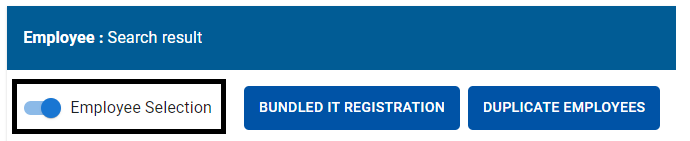
- Select all employees with the status NOT VERIFIED.
- Click BUNDLED IT REGISTRATION.
- Enter you eFiling credentials and click LOGIN to synchronise.
- The system submits all employees for registration.
NOTE: The process to register employees can take up to 24 hours, and will require you to synchronise again. Refer to the e@syFile™ Employer Guide for more details.
4. Update income tax reference numbers on your payroll
Before you export your tax certificate file, you'll need to update the new tax numbers in your payroll.
NOTE: e@syFile™ Employer TC doesn't offer an export function for employees with tax numbers.
- Identify employees without income tax numbers from your original ITREG export.
- Access your payroll company.
- You can update the tax numbers manually per employee or with Flexi Fixed utility.
Finance software that powers strategic growth
Sage Intacct is our most powerful cloud solution for finance leaders. Automate your financial processes, gain instant insights and drive strategic growth.

 Africa
 Asia
Asia Australia
 Canada
 France
 Ireland
 Kenya
Kenya Nigeria
 Portugal
 Spain
Spain United Arab Emirates
 United Kingdom
 United States
 Germany