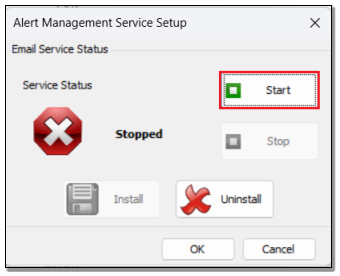
Alert Manager: Nothing happens clicking Start button on Alert Manager (AM) Service Setup screen on opened EvolutionAMServiceManager.exe file, (AM) Email Service fails to start
Summary
Description
This article discusses how to fix the following issue:
The AM Email Service fails to start when you click the Start button on the Alert Manager Service Setup screen. There’s no error message, and nothing seems to happen.
Resolution
Consider the following advice to resolve the above issue:
A. Restart the local PC
1. Close Evolution and all applications on the local PC
2. Restart the PC.
3. You should now be able to start the Email Service.
If the issue persists afterwards, consider the rest of the article below.
B. Local PC Windows account
Consult with your local IT technician if your local PC’s logged-in Windows account has sufficient user permissions to start any services on your PC
If the issue persists afterwards, consider the rest of the article below.
C. Antivirus and Windows Firewall Settings
Check if your local PC’s antivirus and/or Windows Firewall may be blocking the start of certain services, including the AM Email Service.
If so, reconfigure them to allow for starting the AM Email Service.
If the issue persists afterwards, consider the rest of the article below.
D. Network Domain Policies
Consult with your local IT technician if your network Domain Policies may be blocking the start of any specific services. Arrange for the unblocking of this service, if that is the case.
If the issue persists afterwards, consider the rest of the article below.
E. Uninstall and Reinstall Sage Evolution
UNINSTALLATION
Open this link for a detailed article that discusses how to uninstall Evolution.
Do this on the affected workstations (with Evolution locally installed), or on the main RDP/hosted Evolution server (as relevant).
INSTALLATION
Open this link for a detailed article that discusses how to install Evolution.
Do this on the affected workstations (with Evolution locally installed) or on the main RDP/hosted Evolution server (as relevant).
Solution Properties
- Solution ID
- 241229083249613
- Last Modified Date
- Wed Apr 08 05:20:52 UTC 2026
- Views
- 0