

Summary
Find out how to complete the Start New Period process to access May 2024, if your payroll is not on Release 6.2a for Sage VIP Classic or Sage VIP Premier.
Description
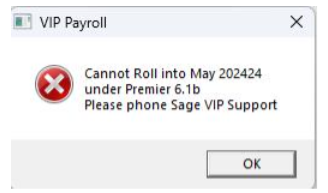
You are attempting a Start New Period from April 2023 into May 2023 but the message displays that you are unable to continue with the process and need to contact Sage Support.
 EXAMPLE:
Cause
The warning message indicate your payroll is not on the latest release and must be updated to be able to start the next calendar payroll month.
You will not be able to complete a Start New Period without updating to Release 6.2a.
Resolution
- You will only be able to start a new payroll month if your system is updated to Release 6.2a
- Log into the Sage Portal and download the applicable software, installation notes and release notes
 CAUTION: You have processed on the previous year's tax tables and rates, and the new software will recalculate the employees' tax.
- Tax will be recalculated according to the 2024/2025 tax tables - this will impact on the net salaries already paid to the employees for April 2024 - Even though there was no changes to the tax tables, this will need to be reviewed
- Review the Medical Aid Tax Credits (if applicable) - this can only be corrected by adjusting the beneficiaries and changing it back to the existing number of beneficiaries to recalculate the tax credits. If left as it, the Medical Aid Credits can be claimed on personal assessment
- Reimbursive Travel transactions would have been processed at the previous year's prescribed rate - this will need to be corrected by deleting and reprocessing the transactions, and might impact on PAYE, SDL and UIF calculations for imapcted employees
- You will need to balance back to the employee payslip values if the net salary values changed after updating
 NOTE: Shoud you require assistance with the above mentioned steps, please contact your Sage Business Partner.
 Africa
 Asia
Asia Australia
 Canada
 France
 Ireland
 Kenya
Kenya Nigeria
 Portugal
 Spain
Spain United Arab Emirates
 United Kingdom
 United States
 Germany