

Summary
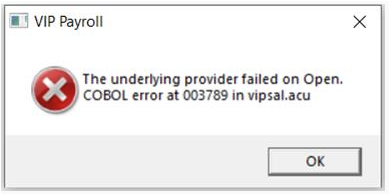
How to solve the error message 'The underlying provider failed to Open' on Sage VIP Premier and Sage VIP Classic.
Description
The error message displays when accessing the payroll system. You can't access the application or the companies.
Cause
From Release 6.1a, there are two installation files to select:
- 32-bit installation file
- 64-bit installation file
The error indicates an incompatibility between the program files and the runtime.
Resolution
- Click Windows button on the taskbar.
- Search for Control Panel and open the application.
- Select Programs and Features.
- Locate the application Sage Connected Services.
- Right-click and select Uninstall.
- Wait for the process to complete.
- Locate the application Sage VIP Runtime.
- You’ll see either a (x86) or (x64) version
- Right-click and select Uninstall.
- Wait for the process to complete.
- Close the Control Panel and return to your desktop.
- Locate your Sage VIP icon.
- Right-click on the icon and select Run as administrator.
- At this point, we install both Sage Connected Services and Sage VIP Runtime installs
- We expect the system with companies to open without any errors
Simplify complex payroll for your growing business in a single powerful cloud-platform
Sage Payroll Advanced ensures year‑round tax compliance and adds HR functionality to cut admin and support your growing workforce.

 Africa
 Asia
 Australia
 Canada
 France
 Ireland
 Kenya
 Nigeria
 Portugal
 Spain
 United Arab Emirates
 United Kingdom
 United States
 Germany