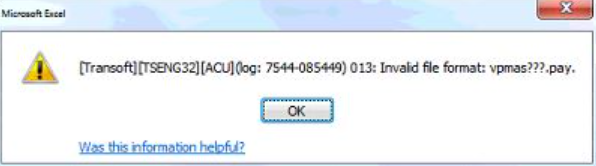
ODBC error "Transoft][Tseng32][ACU] (log: xxxx-xxxxx)013: Invalid file format: vpmas???.pay" when refreshing report
Summary
This article will assist in resolving the system error "Transoft][Tseng32][ACU] (log: xxxx-xxxxx) 013: Invalid file format: vpmas???.pay" for Sage VIP Premier and Sage VIP Classic when running ODBC reports.
Description
The error occurs when you run a customised/own ODBC report.
Cause
This is due to the new Runtime that change the Vision Version of the file to a Vision 6 version.
Resolution
Rebuild the company files
- Access Comand Prompt (CMD) from your Taskbar/Windows menu
- Navigate to your system folder
- Type in the command VUTIL.EXE -R -5 -A *.PAY and press <enter>
- All file will be rebuild on Vision 5 version
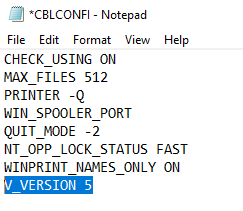
Add version command in CBLCONFI file
- Access File Explorer
- Navigate to the system folder
- Locate the file CBLCONFI in your system folder
- Right-click on the file and select to edit with Notepad
- Ensure that the command line V_VERSION 5 appears in the file
 EXAMPLE:
- Select FILE > SAVE to save file
- Close CBLCONFI file
- Relaunch the application
Once completed, you can Apply changes for ODBC and run the report again
Solution Properties
- Solution ID
- 210401084045683
- Last Modified Date
- Mon Oct 24 20:32:48 UTC 2022
- Views
- 0