

Summary
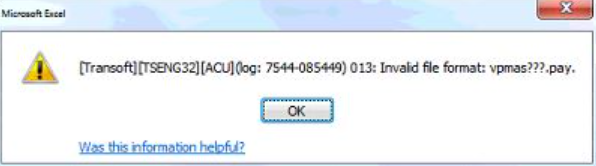
This article will assist in resolving the system error "Transoft][Tseng32][ACU] (log: xxxx-xxxxx) 013: Invalid file format: vpmas???.pay" for Sage VIP Premier and Sage VIP Classic when running ODBC reports.
Description
The error occurs when you run a customised/own ODBC report.
Cause
This is due to the new Runtime that change the Vision Version of the file to a Vision 6 version.
Resolution
Rebuild the company files
- Access Comand Prompt (CMD) from your Taskbar/Windows menu
- Navigate to your system folder
- Type in the command VUTIL.EXE -R -5 -A *.PAY and press <enter>
- All file will be rebuild on Vision 5 version
Add version command in CBLCONFI file
- Access File Explorer
- Navigate to the system folder
- Locate the file CBLCONFI in your system folder
- Right-click on the file and select to edit with Notepad
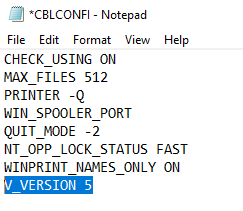
- Ensure that the command line V_VERSION 5 appears in the file
 EXAMPLE:
- Select FILE > SAVE to save file
- Close CBLCONFI file
- Relaunch the application
Once completed, you can Apply changes for ODBC and run the report again
 Africa
 Asia
 Australia
 Canada
 France
 Ireland
 Kenya
 Nigeria
 Portugal
 Spain
 United Arab Emirates
 United Kingdom
 United States
 Germany