

Summary
Description
When when running Sage 50cloud Pastel Accounting as adminIstrator the network drive might not be available when trying to register Pastel or activate companies.


Resolution
 CAUTION: This solution needs advanced Operating System knowledge. Consult your system administrator for help. Sage isn't liable for issues caused by improper changes to the Windows Registry. Always back up your data before applying advanced solutions.
You will then need to make the below changes to your Windows Registry:
• Close all Open Windows
• Hold the Windows Key + R (at the same time)

• Type regedit
• Select OK
• Navigate to:
HKEY_LOCAL_MACHINE\SOFTWARE\Microsoft\Windows\CurrentVersion\Policies\System
• On the right-hand side: Right-click on an empty space, select New and then DWORD (32-bit) Value as illustrated below:

• This will create a New Value entry
• Right-click on the entry and select Rename

• Change the name to EnableLinkedConnections

• Right-Click on the new entry, select Modify

• Select OK
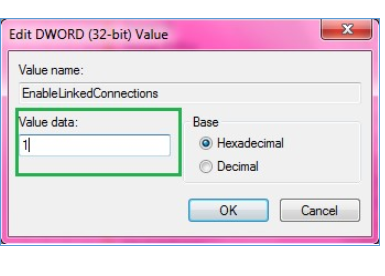
• Close all Windows and restart the PC for the changes to take effect.
 Africa
 Asia
Asia Australia
 Canada
 France
 Ireland
 Kenya
Kenya Nigeria
 Portugal
 Spain
Spain United Arab Emirates
 United Kingdom
 United States
 Germany