How do I remove the SDL amounts for the Skills payment holiday which was applicable from May - August 2020?
Summary
Cause
The South African Ministry of Finance published the revised draft Disaster Management Tax Relief Bill and draft Disaster Management Tax Administration Relief Bill on 1 May.
Click on the link below to read more and access the Draft Bills:
Revised Disaster Management Tax Relief Bill and draft Disaster Management Tax Administration Relief Bill published on 1 May 2020
Employers who are registered for SDL will be exempt from the SDL liability and payment of the SDL contribution.
Effective date: 1 May 2020 – 31 August 2020
According to the SARS FAQ, the SDL liability amount will automatically default to 0.00 on the EMP201 return for the 4-month period.
What is the SDL Payment Holiday?
For the four month period from May to August 2020, employers who are registered for SDL do not have to declare and pay SDL to SARS.
How do I qualify for the SDL Payment Holiday?
All employers who are registered for SDL automatically qualify for the SDL Payment Holiday.
How do I claim the SDL Payment Holiday?
The SDL payment holiday will be automatically provided for. The zero amount SDL Liability will be defaulted on the EMP201 return for the four month period from May to August 2020. When completing your EMP201 for May, the SDL Liability will be defaulted to zero on the EMP201.
What changes should I make to my payroll application to remove the SDL value calculated?
With the installation of the update to Release 5.4c in May 2020, the 1% SDL was cleared to reflect 0%. Payroll administrators were asked to update the payrolls to Release 5.4c in May 2020. Refer to the Release Notes for more information.
 NOTE: Activation of SDL in September - Please access the Basic Company Information Screen at the beginning of your processing period for September (Week 1 in Wage/Biweekly payrolls) and enter SDL Percentage as 1.00%. The 'Period SDL Calculation' must, however, remain selected (ticked) for the rest of the year.
Resolution
If the update to Release 5.4c was not installed in May 2020, but installed in June or later, year to date corrections must be made to remove the SDL values for May (or any other month within the 4 month SDL payment holiday period).
Follow the steps below in each payroll company in order to clear the Skills contributions:
1. Make a data backup for each payroll company.
2. Confirm that the payroll is on Release 5.4c/+. *Updated (Payrolls should now be on Release 5.5a as at October 2020. Release 5.5a is mandatory for all users and IRP5 submission files must be created on Release 5.5a only)
3. The changes will have to be completed manually on each employee record. Access the employees Payslip Screen.
4. Click on the HS (History Screen) button.
5. Access the Company Contributions (Co.Contrib) tab to select the month of May (or other month applicable).
6. Remove the Skills value for each period (May to August only). If Release 5.4c was installed in June, then it is likely that there will be no SDL value from June onwards.
7. Complete this process for each employee.
8. Once all employee records have been updated, print the EMP501 report to confirm that there are no SDL amounts for the May to August period.
Please take note that any History Screen (HS) changes will not reflect on the 12-Month report. Users must use the HS report when completing any reconciliation procedures as the 12-Month report will still reflect the saved SDL values.
 TIP: Should customers require assistance with this process, we recommend that you make contact with your payroll business partner consultant to assist with the process and reconciliations. This correction may also be done just prior to the Interim Reconciliation submission to SARS. Ensure that your consultant is aware of the additional work required so that sufficient time is allocated. Click here to make a booking.
 Very important!
31 August 2020 marks the end of the SDL payment holiday, which was implemented as a Covid-19 tax relief measure.
The following must be completed by the payroll administrator:
Once your payrolls are in month of September 2020, update the SDL from 0% to 1% on the Basic Company Info screen.
This must be done in all payroll companies, in the first week of September!
Take note:
- The system will not automatically revert to the original 1%
- The 'Period SDL Calculation' must remain ticked
For more information please refer to our Sage Knowledgebase article, click here
The following message will display in the system when you do a Start New Period from August into September:
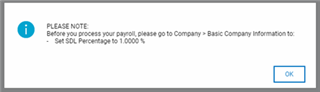
Please access the Basic Company Information Screen at the beginning of the processing period for September 2020, then enter the SDL Percentage as 1.00%.
The 'Period SDL Calculation' must, however, remain selected (ticked) for the rest of the year.
Note:
- Payroll Administrators must action this change as the system will not automatically update this field to reflect the 1%
- Wage and Bi-weekly payrolls must have the 1% SDL activated in week 1 of September 2020.
- Should this be done in any period after the first week/bi-week, manual SDL adjustments will have to be completed by the user on each employee record
Solution Properties
- Solution ID
- 200820075904733
- Last Modified Date
- Tue Dec 02 19:06:55 UTC 2025
- Views
- 0