

Summary
Sage Classic, Sage Premier, Sage 200c VIP: In this article, we provide steps on how to turn off User Account Control.
Resolution
What is the User Access Control or UAC?
The UAC is a security feature in Windows Vista, Windows 7, Windows 8 and Windows 10 which helps prevent unauthorized changes to your computer.
When the UAC is on you will get a prompt to authorize the changes. This prompt does not work for background processes therefore the changes are automatically denied by the UAC.
For the payroll to be accessed and operate successfully you will need to ensure that the Windows User Account Control or UAC has been turned off.
How to turn off the User Account Control in Windows Vista and Windows 7
- Go to Start| Control Panel
- In the search type in UAC and press ‘Enter’ on your keyboard
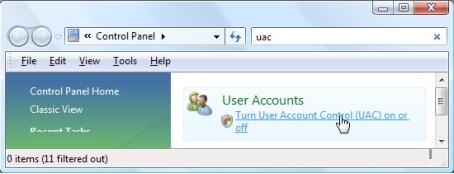
- Click on the option ‘Turn user Account Control (UAC) on or off’
- The ‘Turn on User Account Control (UAC) to make your computer more secure’ screen will display

- Ensure the option Use User Account Control (UAC) to help protect your computer is not ticked
- Go to Start| Control Panel
- In the search type in UAC and press ‘Enter’ on your keyboard

- Click on the option ‘Change User Account Control Settings’
- The ‘User Account Control Settings’ screen will display

- Ensure the slider is at the bottom on Never notify
How to turn off the User Account Control in Windows 8 and Windows 10
- Click the Start button
- Search for UAC

- Select the option Change User Account Control settings
- The ‘User Account Control Settings’ screen will display
 Africa
 Asia
Asia Australia
 Canada
 France
 Ireland
 Kenya
Kenya Nigeria
 Portugal
 Spain
Spain United Arab Emirates
 United Kingdom
 United States
 Germany