

Summary
Description
You may observe the following random error in various places and appearing randomly in the Evolution company, across all or several Evolution workstations.
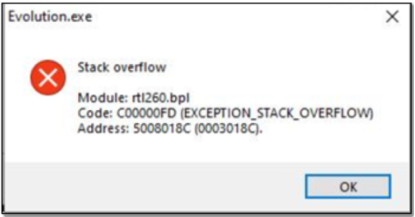
This error is especially relevant on workstations connecting to Terminal Services or when using RDP connections. In some cases, this may cause network lag, thereby resulting in the above error.
Resolution
Consider the following advice to resolve the above error:
A. Sage Evolution Upgrade
Upgrade your company to the latest Sage Evolution version (currently Ver 12.0.1, when this article was updated).
Evolution's relevant system files were improved (since at least version 11.1.6) to prevent this error message.
If the same error is still observed, consider the rest of the article below.
B. Settings and Settings.ini files
1. Close Evolution on the local workstation where the above error is observed.
2. Open Windows Explorer (File Explorer).
3. Go to C:\Program Files (x86)\Sage Evolution.
4. Search for and find a file called settings (with no file extension).
5. Rename it to settings.old
6. Search for and find a file called settings.ini
7. Rename it to settings.old
If the same error is still observed, consider the rest of the article below.
C. 'Trialmodules.dat' error related
The Stack Overflow error may be directly related to the 'Trialmodules.dat' error.
Open this link for an article that explains how to resolve the 'Trialmodules.dat' related error.
If the same error is still observed, consider the rest of the article below.
D. Other reasons and solutions
Open this link for an article that explains how to resolve the 'Trialmodules.dat' related error.
 Africa
 Asia
Asia Australia
 Canada
 France
 Ireland
 Kenya
Kenya Nigeria
 Portugal
 Spain
Spain United Arab Emirates
 United Kingdom
 United States
 Germany