

Summary
Description
This guide can be followed when MS SQL needs to be reinstalled on the same server PC when it became apparent something has gone wrong with the current MS SQL installation / the SQL system files.
In this case it should be prudent to remove all MS SQL components on the server PC but also know the exact sequence of steps to apply.
Resolution
Apply the following steps to achieve the above outcome:
A. Stopping Services
1. If still possible, backup all companies and the EvolutionCommon / SageCommon database.
2. Close all applications/programs on the PC.
3. Go to Computer (This PC) | right click on it and select Manage.
4. On the Computer Management screen, click on the Services node below and scroll down on the right until you notice the MSSQL relevant objects on the right.
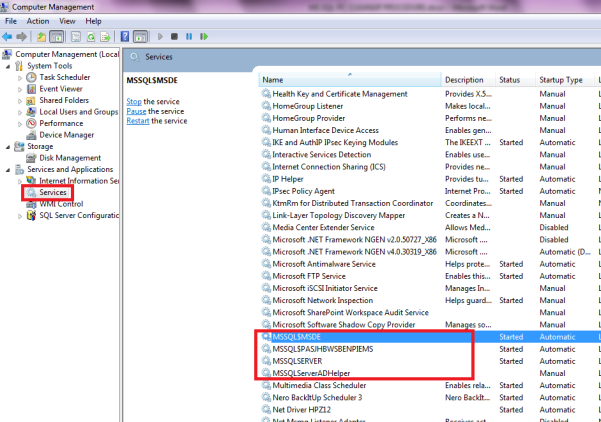
5. Right-click the first service and click on Stop.
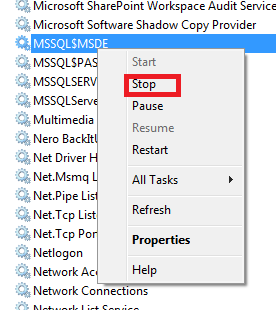
6. Repeat the same steps for all the other MSSQL relevant services.
7. When done, close this screen.
B. Uninstall and Folder Deletion
1. Go to Control Panel | Programs and uninstall all objects relating to MS SQL, e.g. MS SQL Server 2008 R2 and all of the rest.

2. Open Windows Explorer /File Explorer and delete the C:\Program Files\Microsoft SQL Server as well as the C:\Program Files (x86)\Microsoft SQL Server folders.

C. Delete Registry Keys
1. Perform a Registry SQL Cleanup.
1.1 Open the local PC Registry Editor by typing the following command in the Start | Run or Search field: regedit and then enter on the keyboard.
1.2 In the opened Registry Editor find and delete the following folders.
- HKEY_CURRENT_USER\Software\Microsoft\Microsoft SQL Server
- HKEY_LOCAL_MACHINE\SOFTWARE\Microsoft\Microsoft SQL Server
- Also, delete any other MS SQL related folders found here

1.3 When done. close the Registry Editor.
2. Empty the PC’s Recycle Bin.
D. Install MS SQL
1. Shut down the PC and leave it off for a minute, boot it up, and then install MS SQL again.
E. MS SQL Server Configuration
Open this link for an article that discusses how to configure MS SQL Server and the Evolution network after MS SQL Server has been installed.
 Africa
 Asia
Asia Australia
 Canada
 France
 Ireland
 Kenya
Kenya Nigeria
 Portugal
 Spain
Spain United Arab Emirates
 United Kingdom
 United States
 Germany